Compatible Devices and Adapter Notes
The Power Mole delivers 5V USB power through your window, making it directly compatible with many popular WiFi cameras including Blink, Nest and Eufy Cams. Many other cameras are compatible and require a simple adapter, such as USB-A to USB-C. In the table below, we list compatible cameras and the required adapter (if needed). If your device is not listed, send us an email at hello@acquaindustries.com and we'd be happy to check if it is compatible. Of course, the Power Mole works with USB lights and many other products as well.
Note that 9V and 12V cameras are often compatible with the Power Mole, but require a voltage boost adapter. Details for many cameras are listed below.
| Brand & Model | Adapter | Voltage Input |
|---|---|---|
| Blink Mini 1 Indoor | None Needed | 5V |
| Blink Mini 2 Indoor | None Needed | 5V |
| Blink Outdoor 4 Indoor | USB-A to USB-C (Example) | 5V |
| Eufy Indoor Cam E220 Indoor/Outdoor | USB-A to Micro-USB (Example) | 5V |
| Eufy Indoor Cam C120 Indoor | USB-A to Micro-USB (Example) | 5V |
| Eufy Outdoor Cam E210 Outdoor | USB-A to Micro-USB (Example) | 5V |
| Nest Cam Indoor, 1st and 2nd Gen | None Needed | 5V |
| Nest Cam Outdoor | None Needed | 5V |
| Nest Cam Outdoor/Indoor Battery | None Needed | 5V |
| Nest Cam + Outdoor Power Cable | None Needed | 5V |
| Nest Cam Outdoor (Wired, 2nd Gen) | Not compatible | X |
| Ring Indoor Cam (2nd Gen) | USB-A to Micro-USB (Example) | 5V |
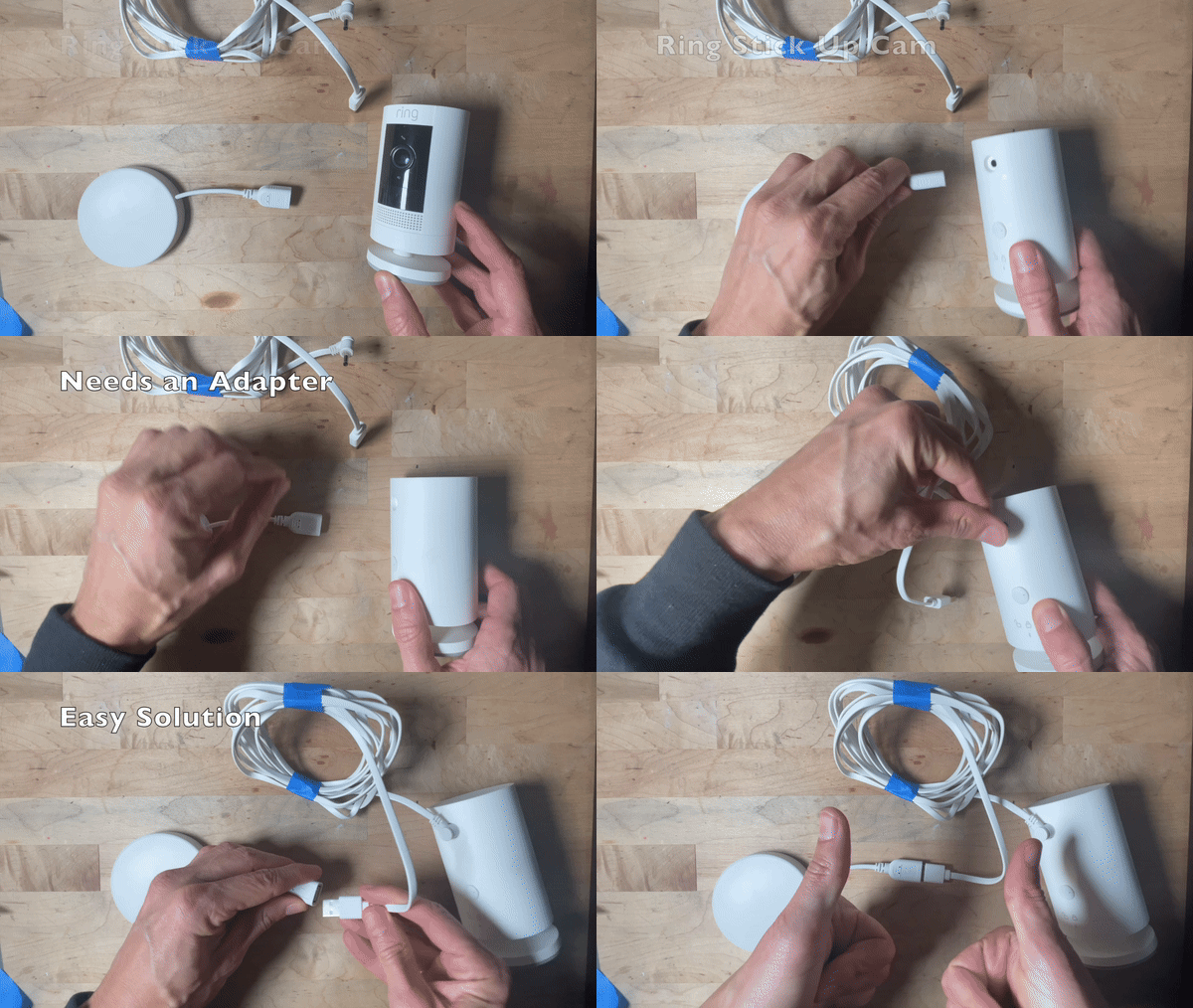
| Ring Stick Up Cam (Plug-In) Indoor/Outdoor | USB-A to Barrel Jack (Example) | 5V |
| Ring Outdoor Cam | USB-A to Barrel Jack (Example) | 5V |
| Ring Outdoor Cam Plus (Battery) | USB-A to USB-C (Example) | 5V |
| Ring Outdoor Cam Plus (Wired) | Not Compatible | X |
| Ring Spotlight Cam Plus (Battery) | USB-A to USB-C (Example) | 5V |
| Tapo MagCam 4K / C460 | USB-A to USB-C (Example) | 5V |
| Tapo C560WS (4 K Wired Pan/Tilt Camera) | 5V to 12V Boost (Example) | 12V |
| Tapo C325WB Outdoor | 5V to 9V Boost (Barrel Input) (Example) | 9V |
| TP-Link Kasa Cam (KC120) Indoor | USB-A to Micro-USB | 5V |
| TP-Link Kasa Cam (KC200) Outdoor | USB-A to Micro-USB (Example) | 5V |
| TP-Link Kasa Spot Cam (KC100) Indoor | USB-A to Micro-USB (Example) | 5V |
| Winees Security Camera Outdoor | None Needed | 5V |
| Wyze Cam v2 Indoor | USB-A to Micro-USB (Example) | 5V |
| Wyze Cam v3 Indoor/Outdoor | USB-A to Micro-USB (Example) | 5V |
| Wyze Cam v3 Pro Indoor/Outdoor | USB-A to Micro-USB (Example) | 5V |
| Wyze Cam v4 Indoor/Outdoor | USB-A to Micro-USB (Example) | 5V |
| Wyze Cam Pan v2 Indoor | USB-A to Micro-USB (Example) | 5V |
| Wyze Cam Pan v3 Indoor/Outdoor | USB-A to Micro-USB (Example) | 5V |
Many devices are compatible with the Power Mole using simple adapters. The key is to pay attention to the connector type (ex: barrel, USB-C, etc) and the voltage requirement (ex: 5V, 9V). Email us if you're not sure and we can help you get the right adapter.
See the below gif as an example with Ring Stick Up Cam of how easy using an adapter is: